Fit-Gap Analysis in Dynamics 365: A Practical Guide for Consultants
Fit-gap analysis decides how much an ERP program will cost and how easy it will be to upgrade. A practical method for Dynamics 365 consultants, with a classification model and a checklist.
Fit-gap analysis is where an ERP program is quietly won or lost. Every requirement you classify as a "gap" becomes design, development, testing and years of maintenance. Every gap you avoid by adapting the process keeps the solution closer to standard and easier to update.
Dynamics 365 Finance and Supply Chain Management receives continuous updates from Microsoft. That makes staying close to standard even more valuable than it was in the on-premises era. Here is the practical method I use on Dynamics 365 programs.
Fit-gap vs fit-to-standard
Traditional fit-gap starts with the business's wish list and checks the system against it. Fit-to-standard flips the order: you show how Dynamics 365 handles the process first, and then discuss what genuinely does not fit. The second approach produces far fewer gaps because people react to a working process, not to a blank page.
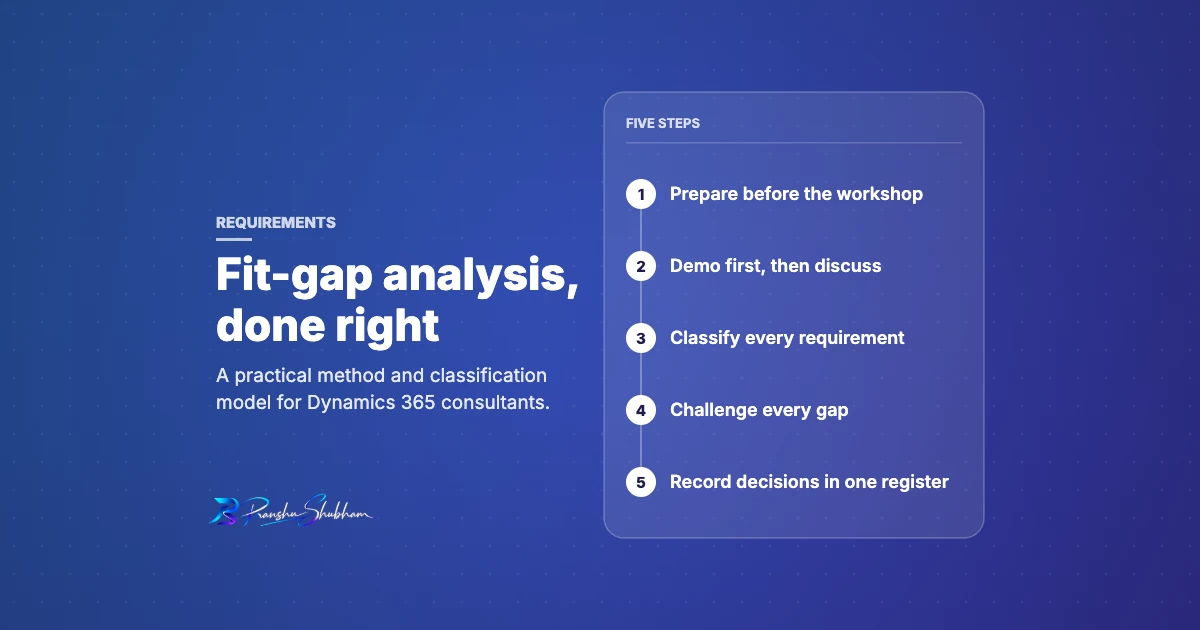
Step 1: Prepare before the workshop
- Agree the business processes in scope, ideally as a process catalog (end-to-end process, process area, business process).
- Configure a demo environment with realistic data: the client's item types, customer groups and a few real scenarios.
- Invite the process owner and the people who actually do the work, not only managers.
Step 2: Demo first, then discuss
Walk through the standard process in Dynamics 365. After each step, ask: "What would stop you from working this way?" Capture answers as requirements, written as a business need, not as a solution. "We need to see credit exposure before releasing an order" is a requirement. "Add a red field on the sales order" is a solution.
Step 3: Classify every requirement
| Classification | Meaning | Typical action |
|---|---|---|
| Fit | Standard does it as is | Document and test |
| Configuration | Standard does it with setup | Record the setup decision |
| Process change | The business adapts to standard | Agree with the process owner and plan training |
| Workaround | Manual or low-code step, no extension | Power Automate, a report or a procedure |
| Gap | Needs an extension, ISV or integration | Functional design document, estimate, approval |
Step 4: Challenge every gap
Before a gap is approved, ask four questions:
- What happens to the business if we do not build this?
- Can a process change achieve the same outcome?
- Can configuration, Power Platform or an ISV solution meet it?
- Is the value worth the build, test and maintenance cost?
Many "must-have" requirements turn out to be habits from the old system. A design authority that reviews every gap keeps the program honest.
Step 5: Record decisions in one register
Keep a single fit-gap register with an ID, process reference, requirement, classification, resolution, owner, priority and status. Link each gap to its design document and test case. This register later becomes your requirements traceability matrix.
Common mistakes
- Running workshops as interviews instead of demos.
- Writing solutions instead of requirements.
- Approving gaps without an estimate or a business owner.
- Letting the register drift out of date after design sign-off.
Frequently asked questions
How long does fit-gap take? It depends on scope. For each end-to-end process, plan preparation, one or more workshops and time to document decisions. Rushing it creates expensive surprises later.
Who should approve gaps? A design authority with the solution architect, the business process owner and the program manager.
What is a good fit rate? There is no universal target. The goal is that every gap left is justified by real business value.
Tools to run it well
Download the free e-book Fit-Gap Analysis Masterclass for Dynamics 365, the Business Process Catalog (L1-L4) Template and the ERP Requirements Traceability Matrix. For a guided method, join the ERP Implementation Playbook course or watch How to Run a Fit-Gap Workshop.