D365 Return Orders (RMA): The Complete Process, Step by Step
Not every sale is final. How return orders work in D365, from the customer call to the credit note.
Part 9 of 14 in my free course D365 Supply Chain, end to end. All screenshots come from a Microsoft demo environment with standard Contoso data (company USMF). New here? Start with the series home.
Not every sale is final. A customer receives damaged goods, the wrong item, or simply changes their mind. In Dynamics 365 that's a return order, also called an RMA (return material authorization).
Returns look simple, but they touch inventory, quality, finance and customer service at the same time. In this part we walk through the RMA flow using demo return order RMA 00021 for our customer US-001 Contoso Retail San Diego. To be transparent: for this part I used a return order that already exists in the USMF demo data, rather than creating a new one.
1. The story
Who this section is for: Freshers, customers and anyone new to D365
The customer calls. Customer service checks the original sale and creates an RMA with a reason (damaged, wrong item, and so on). The customer sends the goods back with the RMA number. The warehouse receives and inspects them, and decides what happens: back to stock, scrap, or return to the customer. Finally finance issues a credit note, or the customer gets a replacement.
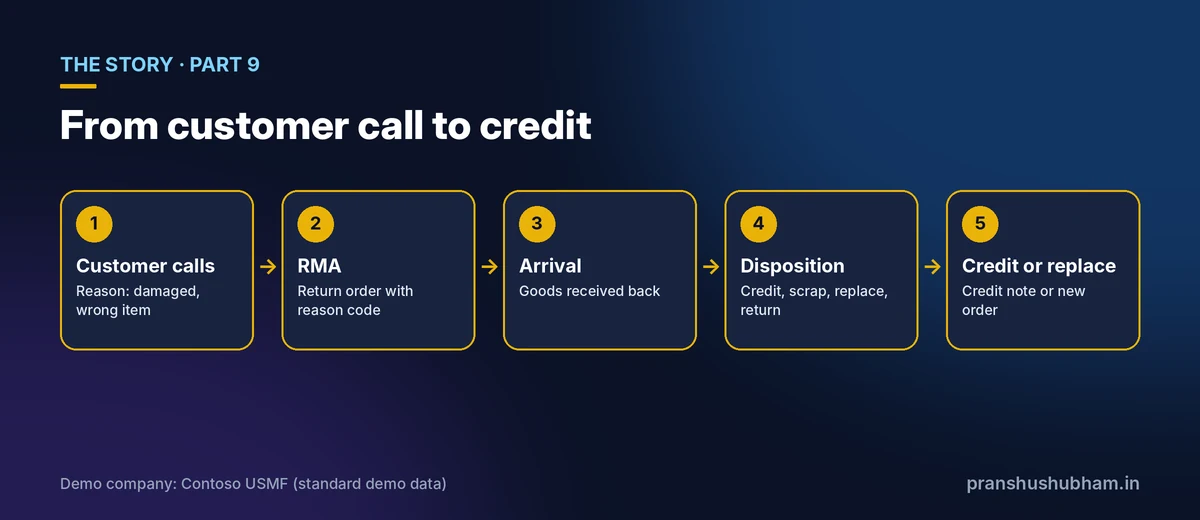
Glossary. RMA: the return order number the customer quotes. Return reason code: why it came back. Disposition code: what we do with it (credit, scrap, replace, return). Credit note: a negative invoice.
2. Step by step in D365
Who this section is for: End users and functional consultants
Step 1: Open the return orders list
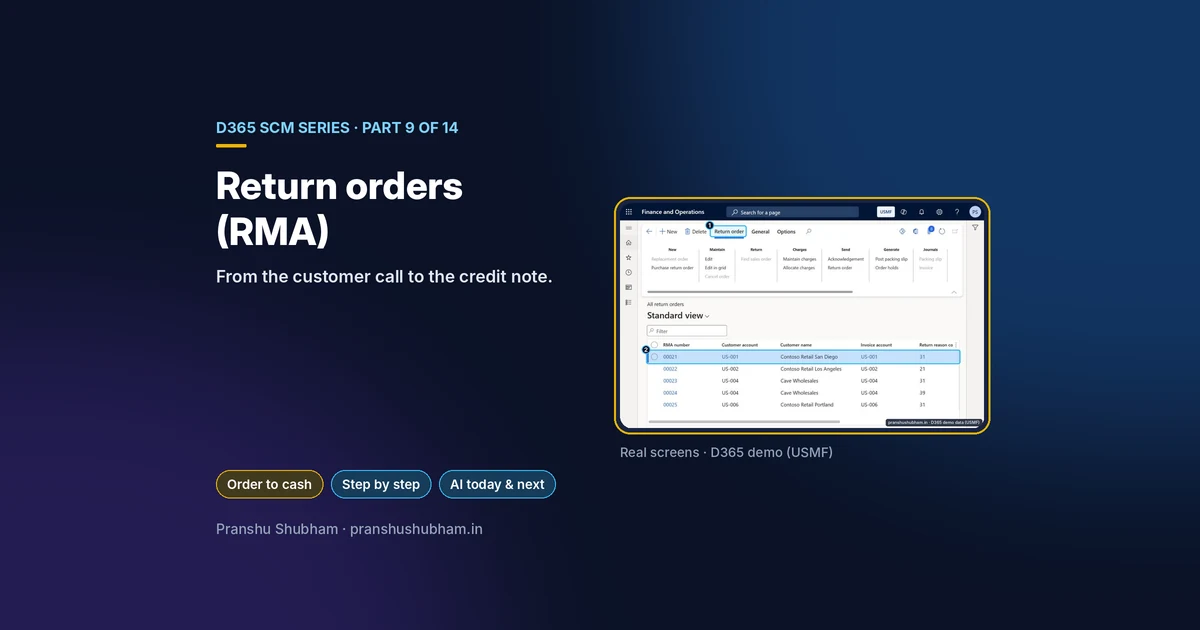
Go to Sales and marketing > Sales return > All return orders. Each row is an RMA with customer, invoice account and return reason code.
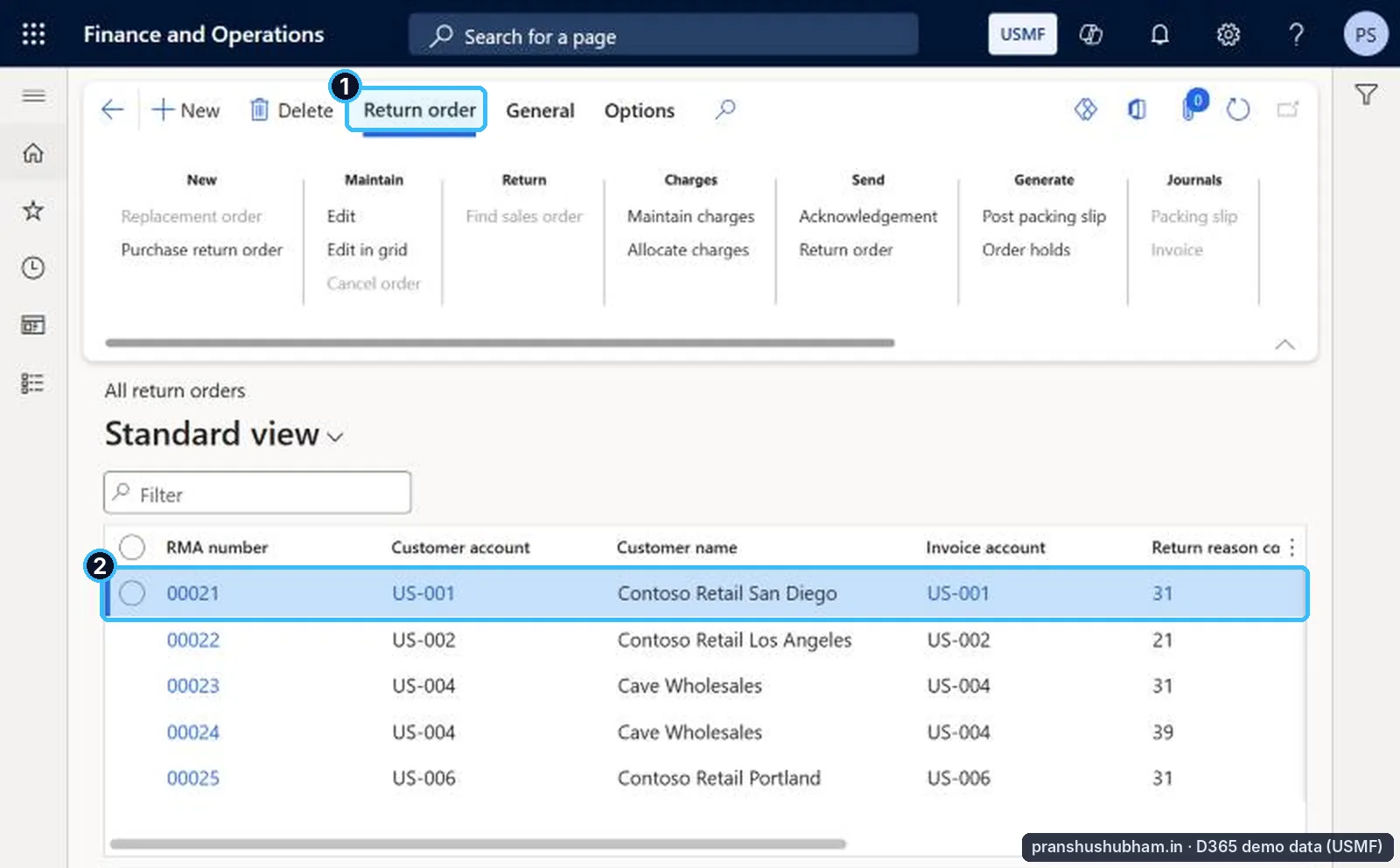
(1) The Return order tab holds the RMA actions. (2) RMA 00021 for US-001 with return reason code 31.
Step 2: Create a new RMA (how you'd do it)
Select New. Enter the Customer account, a Return reason code and, if you want, a Return deadline. D365 creates both an RMA number and a return-type sales order behind it.
Step 3: Find the original sales order
On the RMA, use Find sales order (under Return on the Action Pane). Pick the invoiced lines being returned. This copies the original price and cost, so the credit and the inventory value are correct. Typing the lines manually works, but you lose that link.
Step 4: Read the RMA lines
Open RMA 00021. The header shows the return-type sales order (000768) and status Open. The lines show negative quantities: -58 of T0001 SpeakerCable and -58 of T0004 Television.
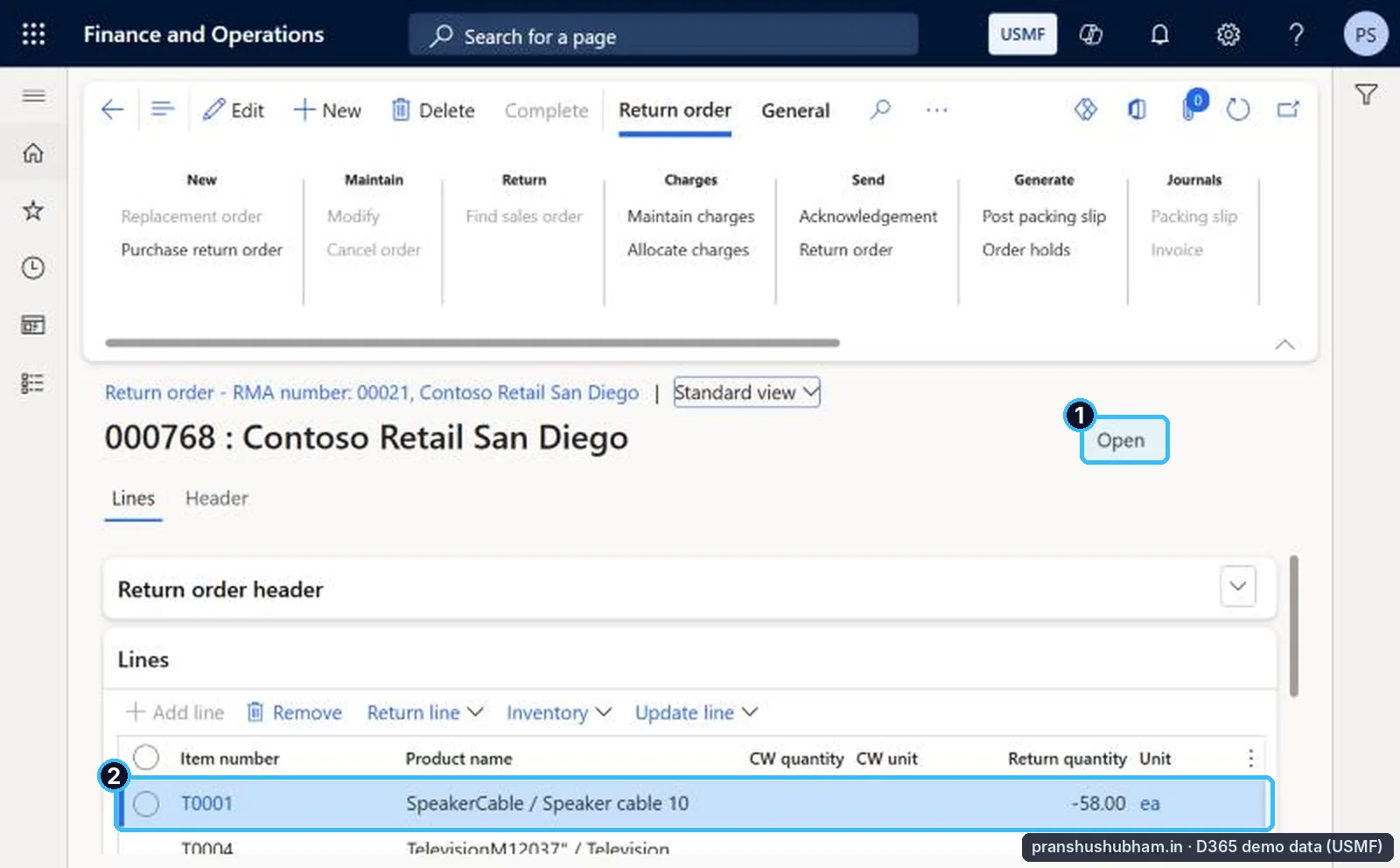
(1) Status Open. (2) Return lines with negative quantities, because goods are coming back in.
Useful actions on this page:
- Send > Acknowledgement: send the RMA confirmation to the customer.
- New > Replacement order: create a replacement sales order, before or after the goods arrive.
- Purchase return order: send the item back to your own vendor.
- Generate > Post packing slip: post the return receipt (for basic, non-WMS warehouses).
Step 5: Arrival and inspection
When the goods arrive, register them. In basic warehouses, use Inventory management > Inbound orders > Arrival overview or the RMA line's registration. In WMS warehouses, use the mobile app's return receiving menu item. During registration, choose a disposition code. Each code points to one of six built-in actions:
- Credit: the item goes back into inventory and the customer is credited.
- Credit only: the customer is credited, but the item isn't physically returned.
- Scrap: credit the customer and scrap the item.
- Replace and credit: back into inventory, credit, and a replacement order.
- Replace and scrap: scrap, credit, and a replacement order.
- Return to customer: sent back after inspection, no credit.
In WMS warehouses, a disposition code is mandatory when you register returns on a mobile device.
Step 6: Packing slip and credit note
Post the return packing slip (the goods are now physically back), then post the invoice. On a return order, the invoice is a credit note that reduces the customer's balance.
3. Behind the scenes
Who this section is for: Working professionals and functional consultants
- A return is a sales order with negative quantities. The RMA header (return details) links to a sales order of type "Returned order". That's why sales order tools work on returns.
- Inventory value. With "Find sales order", the return line carries a return cost price from the original issue, so stock comes back at the cost it left at.
- Disposition codes drive the action. They're set up under Sales and marketing > Setup > Returns and decide inventory, credit and replacement behavior.
- Charges. Return reason codes can add restocking fees automatically through auto charges.
- Replacement before arrival helps good customers but carries a risk if the goods never come back. Use a return deadline and follow up.
Common mistakes and fixes:
- Credit at the wrong price. Lines were entered manually. Use Find sales order.
- Returned stock is available for sale too early. Use a quarantine warehouse or inventory status (WMS) until inspection.
- RMA open forever. Set return deadlines and review open RMAs weekly.
4. Under the hood
Who this section is for: Technical consultants
- Main tables: SalesTable (with return fields like ReturnItemNum, ReturnReasonCodeId and ReturnDeadline), SalesLine (negative quantities and ReturnDispositionCodeId), ReturnReasonCode, ReturnDispositionCode, and the usual InventTrans, CustPackingSlipJour and CustInvoiceJour for postings.
- Pages: the list page is ReturnTableListPage and the details page is ReturnTableForEdit (you can see these names in the URL).
- Data entities: returns use the sales order entities with return-specific fields. Check field coverage in your version before designing an integration.
- Extensions: disposition logic and registration run through the standard sales posting classes. Extend validation (for example, "no credit without inspection") with Chain of Command on the relevant table or class methods.
5. AI in this process: today and next
Who this section is for: Everyone
There's no return-specific Copilot feature in SCM that I could find on Microsoft Learn at the time of writing. What helps today:
- Sales order summary with Copilot (Available). Returns are sales orders, so the summary helps on the return order's sales order too.
- Collections coordinator summary (Available) gives the customer's balance, aging and payment history when you talk to them about a return.
- Sales Order Agent template (Template). The FastTrack template creates orders from email attachments; the same pattern could create draft RMAs from return requests. That's my idea, not a Microsoft scenario.
My view on what's next (opinion): returns are full of unstructured information: photos, emails, inspection notes. That's a natural fit for agents that draft the RMA and suggest a disposition code for a person to approve.
UAT test scenarios
- Create an RMA with Find sales order. Expected: price and cost copied from the original invoice.
- Register arrival with disposition Credit. Expected: stock back on hand; line ready for credit.
- Register with Credit only. Expected: credit without on-hand increase.
- Create a replacement order before arrival. Expected: new sales order linked to the RMA.
- Post the credit note. Expected: customer balance decreases.
FAQ
Do I need an RMA, or can I just credit? You can credit with a credit note, but an RMA tracks the physical return and its reason.
Can I return to a different warehouse? Yes. Set the warehouse on the RMA lines, often a returns or quarantine warehouse.
What about returns to my vendor? Use a purchase return order from the RMA or directly on the PO.
Keep going in the series
- Series home: D365 Supply Chain, end to end
- Previous: Part 8: Customer invoice and payment
- Next: Part 10: On-hand and counting
Sources
- Sales returns (Microsoft Learn)
- Return reason codes and disposition codes (Microsoft Learn)
- AI summaries with Copilot (Microsoft Learn)
Have a question about this process, or seeing something different in your version? Get in touch. I read every message.