From LCS to Power Platform Admin Center: What Dynamics 365 F&O Teams Must Do in 2026
New D365 F&O projects can no longer start in Lifecycle Services, and existing environments can now be migrated to the Power Platform admin center. What changed and how to prepare.
For years, every Dynamics 365 Finance & Operations project started in Lifecycle Services (LCS). That era is ending. Since February 16, 2026, new customers of Dynamics 365 Finance, Supply Chain Management and Project Operations can't create new cloud implementation projects in LCS. Environments, capacity and support are moving to the Power Platform admin center, and existing customers can now migrate eligible environments themselves.
What has changed
- New projects: new Finance, SCM and Project Operations customers start in the Power Platform admin center, not LCS.
- Existing customers: can keep using their active LCS projects, and can move eligible environments with a self-service migration, currently in public preview.
- Not affected yet: Dynamics 365 Commerce projects, AX 2012 upgrade projects, on-premises implementations and tenant-to-tenant migrations still use LCS.
- Support: the LCS support experience is moving to Help + Support in the Power Platform admin center, and partners are expected to use delegated admin rather than being added to customer projects.
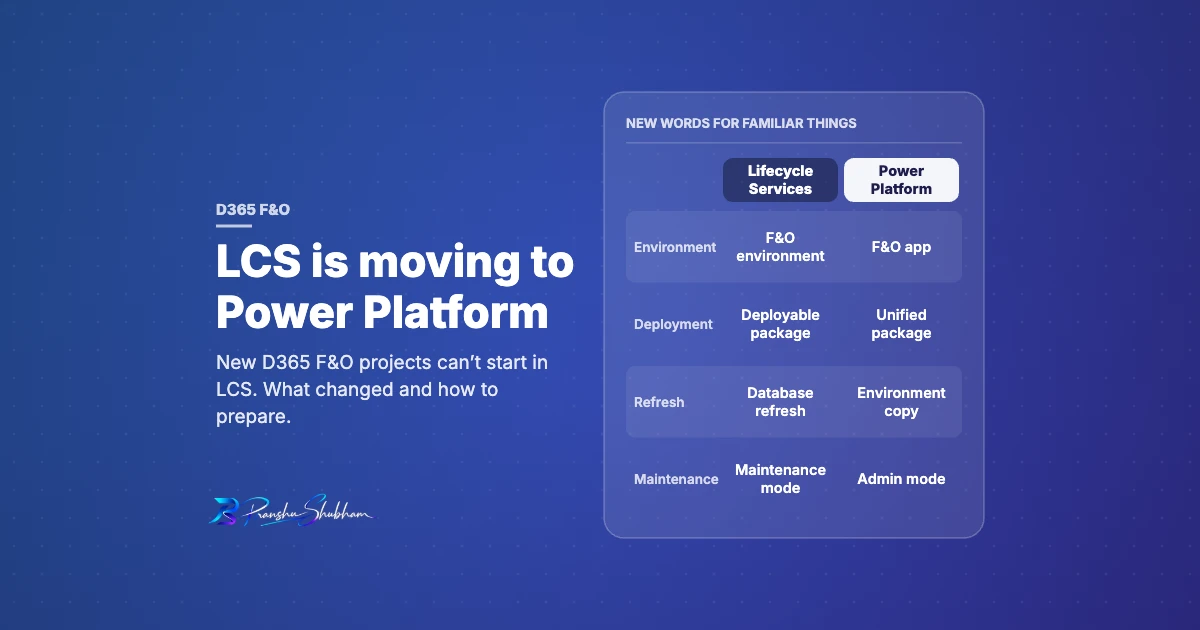
New words for familiar things
| Lifecycle Services | Power Platform admin center |
|---|---|
| Finance and operations environment | Finance and operations app (inside a Power Platform environment) |
| Project Owner role | Power Platform administrator role in Microsoft Entra |
| Software deployable package | Unified package |
| Database refresh | Environment copy |
| Maintenance mode | Admin mode |
| Environment slots you buy | Capacity-based: storage and Power Platform requests |
What the migration preview supports today
According to Microsoft Learn:
- Self-service sandboxes: supported. Migrate and validate these first.
- Production: the action may be available, but production migration isn't recommended during public preview.
- Cloud-hosted developer environments: not supported. Replace them with Unified Developer Environments or a downloadable VHD.
- Environments using Commerce: not supported in the preview, and the prerequisite check doesn't detect Commerce usage, so check this yourself.
- It's one-way: a migrated environment can't be moved back through LCS.
A readiness checklist
- Link each environment to Power Platform (Power Platform integration) and confirm it shows as Deployed in LCS.
- Check capacity. Resolve any Dataverse or operations storage deficit; available capacity is validated before migration.
- Assign the right admins. The person migrating must be an administrator of the linked Power Platform environment. Give support users permanent admin roles.
- Rebuild your ALM. Create Azure Pipelines that produce unified packages, and stand up Unified Developer Environments for developers.
- Plan the window. Microsoft suggests about 15 minutes per AOS instance, plus contingency, and the environment is unavailable during migration.
- Start with one sandbox, run a regression test, then repeat for the others.
- Update partner access to delegated admin so support tickets stay visible to the right people.
Why it's worth doing early
Unified environments put finance and operations apps, Dataverse, Power Apps and Copilot capabilities in one place with one set of lifecycle operations. That's the foundation Microsoft is building its AI agents and newer features on. Teams that move early get time to fix their pipelines and roles before it becomes urgent.
Frequently asked questions
Do existing customers have to leave LCS now?
No. Existing LCS projects keep working. The self-service migration lets you move when you're ready; Microsoft is moving more capabilities to the Power Platform admin center over time.
What replaces cloud-hosted developer VMs?
Unified Developer Environments, where developers use local Visual Studio with the Power Platform and X++ tools and deploy to environments provisioned in the Power Platform admin center.
The takeaway
LCS isn't switched off overnight, but new work has already moved. Link your environments, fix capacity and roles, rebuild your pipelines, and migrate a sandbox first.
I'm Pranshu Shubham, a D365 F&O Solution Architect. If you're planning the move from LCS to the Power Platform admin center, get in touch.
Keep learning on this site
- Dynamics AX 2012 to Dynamics 365 migration guide
- Dynamics 365 F&O data migration checklist
- ERP cutover runbook (free template)
- Power Platform for D365 consultants (video lesson)
- ERP Implementation Playbook: Discovery to Hypercare (course)
Sources
- Microsoft Learn, Lifecycle Services project creation freeze
- Microsoft Learn, Migrate environments from LCS to Power Platform admin center (preview)
- Microsoft Learn, Administration for partners and systems implementers
- Microsoft Learn, Overview of unified admin experience
- Microsoft Learn, Migration of LCS support to Power Platform admin center