Export to Azure Data Lake Stops on November 30, 2026: A D365 F&O Migration Checklist
Microsoft's Export to Azure Data Lake add-in for Dynamics 365 F&O stops for good on November 30, 2026, with no extensions. Here's what to move to, and a 30-day checklist.
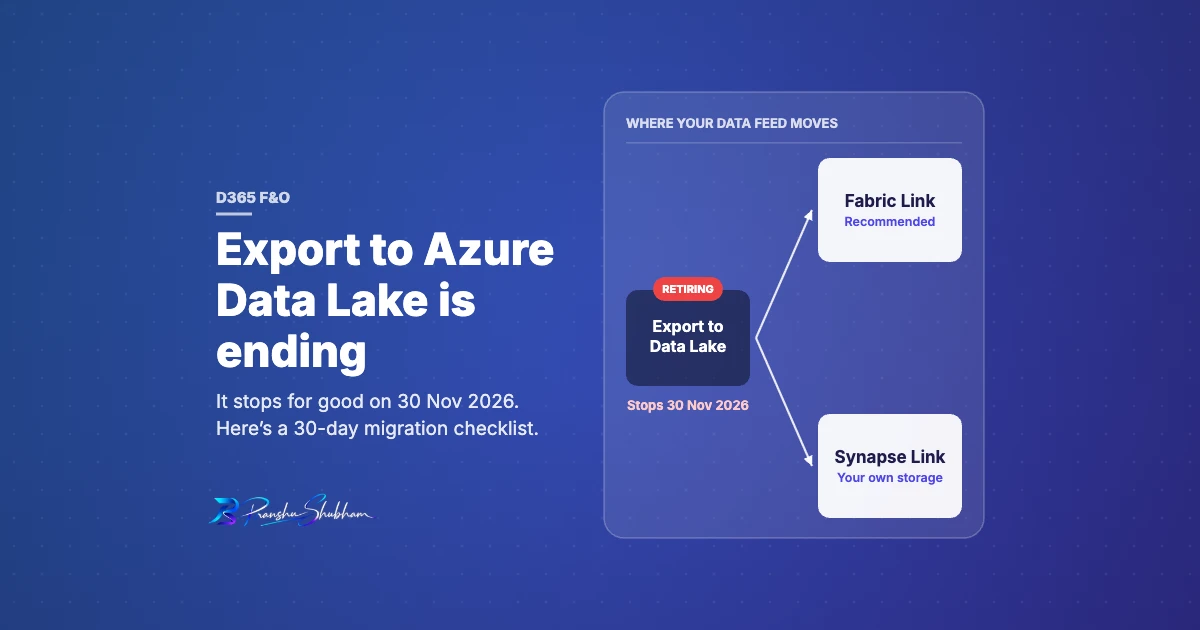
If your Dynamics 365 Finance & Operations reports, data warehouse or Power BI models still depend on the Export to Azure Data Lake add-in, you have a hard deadline. Microsoft retired the service on November 1, 2024, and it permanently stops on November 30, 2026. After that date it exports no new or changed data, and Microsoft has said it won't grant extensions.
Files already in your data lake stay where they are. But every report built on them freezes on the day the feed stops. Here's what changes, which replacement to pick, and a checklist to finish in time.
What exactly stops on November 30, 2026?
The deadline applies only to the legacy Export to Data Lake environment add-in that you installed through Lifecycle Services (LCS). It used change data capture to write CSV files into a customer-managed Azure Data Lake. According to Microsoft Learn, the notice doesn't apply to Link to Microsoft Fabric or Azure Synapse Link for Dataverse; both remain supported.
Your two replacement options
| Link to Microsoft Fabric | Azure Synapse Link for Dataverse | |
|---|---|---|
| How it works | No-copy, no-ETL link. Authorized Fabric users query a read-replica of your data | Continuous export to your own Azure storage account |
| Best for | Teams moving analytics to Fabric and Power BI | Teams that must keep exporting into their own storage and pipelines |
| Microsoft's guidance | Recommended option, with low-latency sync, for customers leaving legacy services | Same data shapes as Export to Data Lake, so downstream pipelines can stay |
| Setup | Configured in Power Apps (make.powerapps.com) | Configured in Power Apps; up to 1,000 tables per profile |
One more date to note: the Delta Lake (Parquet) export option inside Azure Synapse Link isn't available to new customers from October 15, 2026, and existing users must move to CSV output or Link to Fabric by December 2027. If you're choosing today and want Delta or Parquet, Microsoft points you to Link to Fabric.
A 30-day migration checklist
- Inventory what reads the lake. List every Power BI dataset, Synapse or Databricks job, data warehouse load and integration that uses the exported folders.
- List the tables and entities you export. Re-select them in the new service; the table limits of Export to Data Lake no longer apply.
- Choose Fabric link or Synapse Link using the table above. Many teams use Fabric link for analytics and keep Synapse Link only where a pipeline needs files in their own storage.
- Set it up in a sandbox first. Confirm your finance and operations environment is linked to Power Platform, then create the profile in Power Apps.
- Run both feeds in parallel for a few days and reconcile row counts and totals for key tables such as general ledger, inventory transactions and sales lines.
- Repoint reports and pipelines, then test refresh times and security.
- Uninstall the old add-in in LCS once nothing depends on it. Microsoft notes this causes no downtime and leaves existing files in place.
What about BYOD?
Bring your own database (BYOD) has no retirement date announced, according to Microsoft's FAQ, but Microsoft recommends moving to Synapse Link or Fabric link. If you're touching your data architecture anyway, it's a good moment to plan that move too.
Frequently asked questions
Can I get an extension past November 30, 2026?
No. Microsoft states it won't grant extensions after that date.
Will I lose the data already exported?
No. Existing files remain in your data lake, but they stop updating.
Is Link to Fabric being retired too?
No. The deadline applies only to the legacy Export to Data Lake add-in.
The takeaway
This is a one-month project for most teams, if it starts now. Inventory the consumers, pick Fabric link or Synapse Link, reconcile in a sandbox, and switch before the feed goes quiet.
I'm Pranshu Shubham, a D365 F&O Solution Architect. If you need help planning the move from Export to Data Lake, get in touch.
Keep learning on this site
- ERP analytics with Microsoft Fabric: the Superbet case study
- Data entities and the Data management framework (video lesson)
- Integration patterns for D365 F&O (video lesson)
- Dynamics 365 Integration Patterns Workshop (course)