9 Free AI Agents for Dynamics 365 ERP (and Which One I’d Try First)
Microsoft’s FastTrack team has published 9 free AI agent templates for Dynamics 365 ERP on GitHub. What each one does, how much freedom it gets, what it costs, and where to start safely.
Part 2 of my series from the Microsoft FastTrack AI Bootcamp in Redmond. Missed Part 1? Start with AI Agents in Dynamics 365: What I Learned in 3 Days at Microsoft HQ.
Last week I said agents are coming to your ERP.
This week I've got better news: some of them are already here. And you can download them for free today.
During the bootcamp, the FastTrack team walked us through their library of ERP agent templates. Honestly, I expected a few nice slides and a "coming soon". When I got home and went looking, I found the whole lot sitting in a public GitHub repo: install guides, test files, architecture notes, even a hands-on lab.
So grab a coffee. Let's open the box together.
What exactly is a Dynamics 365 agent template?
The easiest way I can explain it: it's a recipe, not a ready meal.
Microsoft gives you the ingredients (a Copilot Studio agent, the flows, the connectors and the instructions) plus the method. But you still cook it in your own kitchen, with your environment, your security, your data and your rules.
What I really appreciated is how honest Microsoft is about this. The catalog says in black and white that being listed "does not mean a template is ready for production." No hype. Just a very good head start.
You can browse the full catalog yourself here: AI ERP Agent Templates on GitHub.
The 9 agents, sorted by how much freedom they get
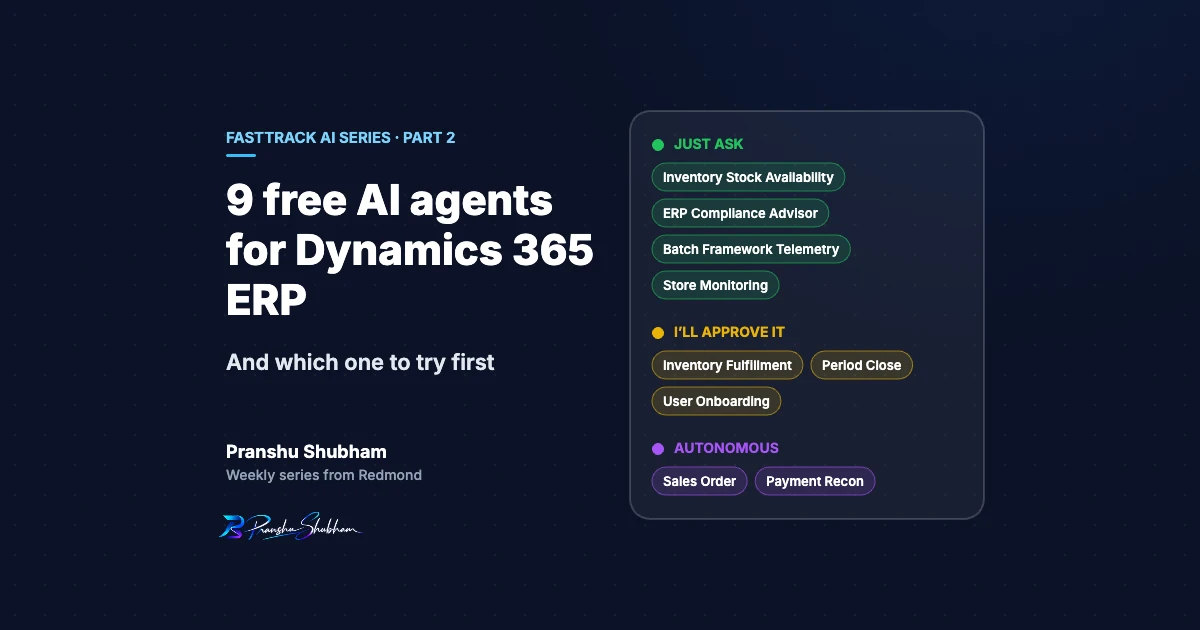
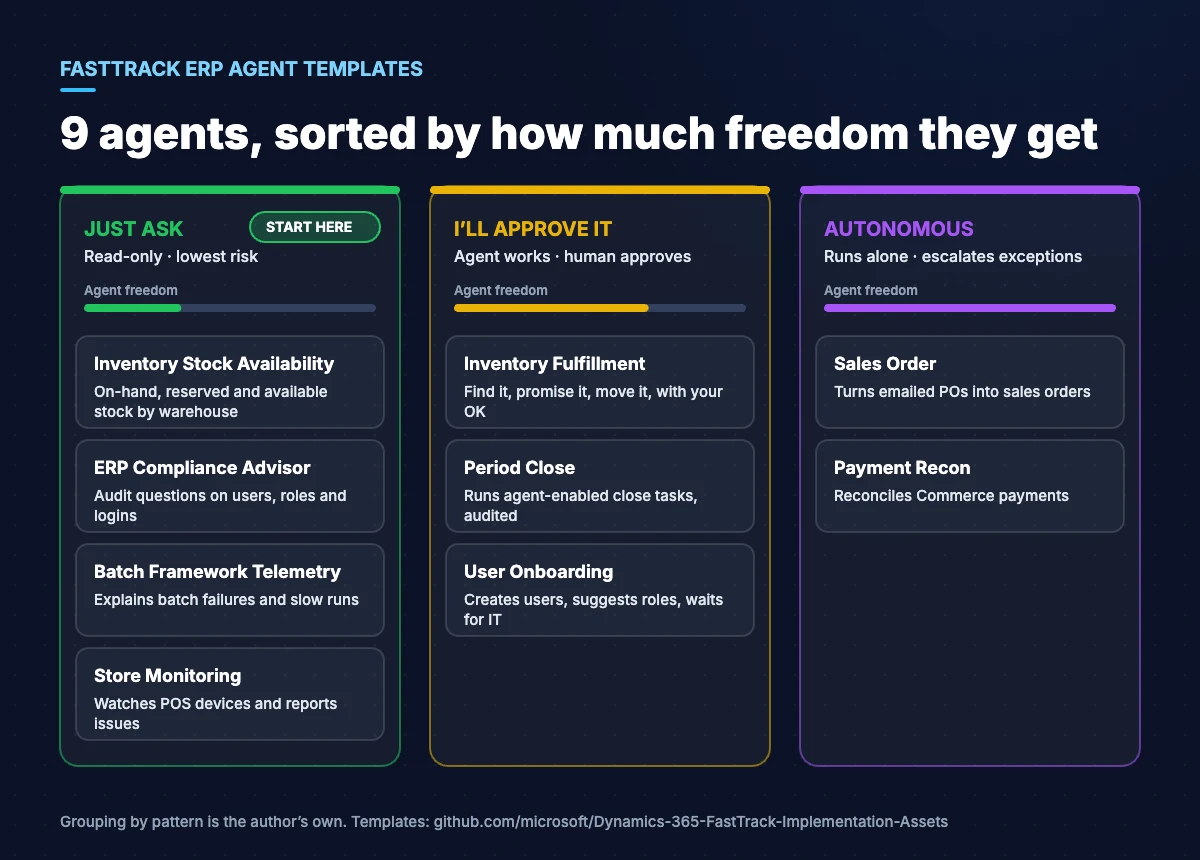
In Part 1 we talked about three patterns: interactive, outcome delegated and autonomous. That's the lens I used to sort the catalog. To be clear, the grouping is my own, not Microsoft's.
Group 1: the "just ask" agents (read-only, lowest risk)
1. Inventory Stock Availability Agent. You ask, "How many units of this item do we have in the Dallas warehouse?" and it tells you what's on hand, reserved and available, by item, warehouse and legal entity. It's read-only by design. It can't reserve, move or change a thing, which makes it a lovely first agent. View on GitHub
2. ERP Compliance Advisor Agent. Every auditor I know will like this one. Ask it something like "Which System Administrators haven't logged in for 90 days?" and it does the cross-checking for you. It comes with 19 tools and every one is read-only. Microsoft even recommends running it under a narrow audit role rather than an admin account. Good habits built in. View on GitHub
3. Batch Framework Telemetry Agent. If you've ever been woken up because "the batch jobs failed again", this one's for you. It reads your Application Insights telemetry and explains failures, throttling and slow runs in plain English. It needs version 10.0.45 or later, with Application Insights connected. View on GitHub
4. Store Monitoring Agent. For my retail friends: it keeps an eye on your Windows POS devices, covering devices going offline, app errors, slow Retail Server calls and offline database health. Interestingly, it's designed not to fix anything on its own. It investigates and reports to a person. View on GitHub
Group 2: the "do the work, I'll approve it" agents
5. Inventory Fulfillment Agent. Its tagline made me smile: "Find it. Promise it. Move it." It finds the product, checks stock and available-to-promise, suggests how to fulfil, and can help create sales and transfer orders. The important part: nothing is written without your confirmation. Version 2 runs on the new Copilot harness and the Dynamics 365 ERP MCP connector we talked about in Part 1. View on GitHub
6. Period Close Agent. Finance teams, this one's yours. It works from the Financial Period Close Workspace, runs only the tasks you've marked for it, prepares unposted journals, exports the trial balance and politely chases people who are late. Every status change is audited and double-checked against Dynamics 365. Two things to know: production use is currently switched on by Microsoft on request, and a human stays responsible for every posting. View on GitHub · Watch the TechTalk
7. User Onboarding Agent. It reads the HR onboarding email, creates the user in Entra ID and suggests Dynamics 365 roles based on the job duties. Then it waits for IT to approve in a Teams card before assigning anything. Exactly how it should be. View on GitHub
Group 3: the "run on your own, call me if you're stuck" agents
8. Sales Order Agent. This is the headline act. It watches a mailbox, reads PDF or image purchase orders, validates the customer and products, creates the sales order and sends a notification. Anything it isn't sure about goes to a human reviewer.
My favourite detail is how open Microsoft is about cost: roughly 30 to 80 Copilot Studio credits per attachment, which works out to about 30 to 80 cents. Finally, a number you can put in a business case. View on GitHub
9. Payment Recon Agent. Automated payment reconciliation for Dynamics 365 Commerce, with an Adyen integration included. View on GitHub
Which agent should you try first?
If a client asked me tomorrow, my answer would be simple:
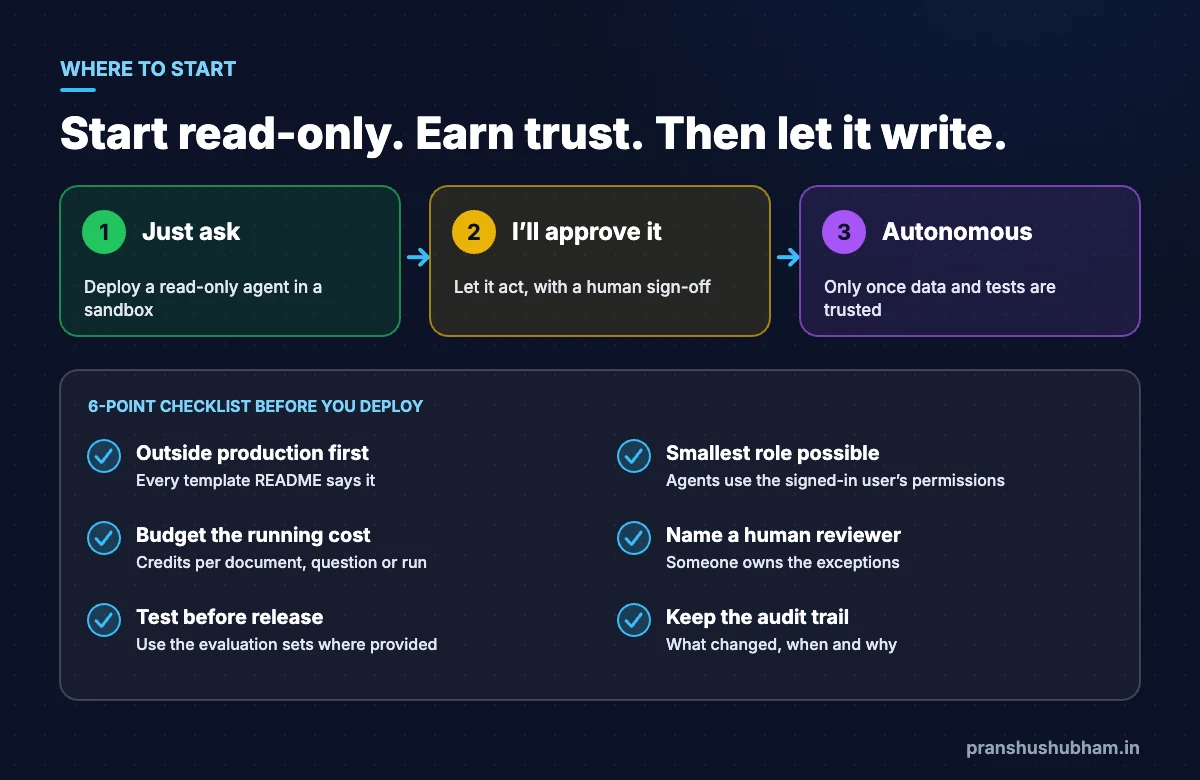
Start read-only. Earn trust. Then let it write.
- Begin with a "just ask" agent in a sandbox: Stock Availability, Compliance Advisor or Batch Telemetry. There's no risk to your data, your team gets a quick "wow, that's useful", and you learn how Copilot Studio, connectors and security fit together.
- Then move to an "I'll approve it" agent like Inventory Fulfillment, where a person signs off every action.
- Go autonomous last, with Sales Order processing, once you trust your data, your testing and your exception handling.
In my experience, ERP projects rarely fail because of technology. They fail when people stop trusting the system. Agents are no different.
My 6-point checklist before you deploy any of them
- Try it outside production first. Every README says it, and they mean it.
- Give it the smallest role possible. The agent works with the signed-in user's permissions.
- Budget for the running cost. Estimate credits per document, per question or per run.
- Name a real person as the reviewer. Someone has to own the exceptions.
- Test before you release. Some templates even ship with evaluation test sets, so use them.
- Keep the audit trail. If an agent changed something, you should be able to see what, when and why.
The bigger picture
A year ago, most of us were asking: "Can AI actually do anything useful in ERP?"
Today Microsoft has put nine working examples on GitHub for anyone to try.
So the question has quietly changed to: "Which process do we trust an agent with first, and how do we keep it safe?"
That's not really a technology question. It's a design question, and that's where those of us who understand both the business and the system can add the most value.
"The best first agent isn't the smartest one. It's the one your team trusts on day one." — Pranshu Shubham
Frequently asked questions
Are the Dynamics 365 ERP agent templates free?
Yes. The templates are published for free in Microsoft's public Dynamics 365 FastTrack Implementation Assets repository on GitHub. Running them still needs the relevant licences, such as Copilot Studio and Dynamics 365, and uses Copilot Studio credits.
Are the agent templates ready for production?
Not out of the box. Microsoft states that inclusion in the catalog does not mean a template is production-ready. Evaluate each one in a non-production environment and adapt it to your processes and security model first.
Which Dynamics 365 agent template should I try first?
Start with a read-only agent such as the Inventory Stock Availability Agent, the ERP Compliance Advisor Agent or the Batch Framework Telemetry Agent. They can't change data, so they're the safest way to learn.
How much does the Sales Order Agent cost to run?
Microsoft's documentation estimates around 30 to 80 Copilot Studio credits per processed attachment, depending on document size and complexity, where one credit is about one cent.
Coming next
Part 3: inside the Copilot harness, and how to test an AI agent before you trust it with real orders. Which of these nine would you try first in your business? Planning a Dynamics 365 program with agents in scope? Let's talk.
Keep learning on this site
- Part 1: AI Agents in Dynamics 365: What I Learned in 3 Days at Microsoft HQ
- Building AI agents for Dynamics 365 with MCP
- ERP security in the age of AI agents
- Agentic AI in ERP: hype vs reality
Sources and links (check them yourself)
- AI ERP Agent Templates: full catalog (GitHub)
- Dynamics 365 FastTrack Implementation Assets: main repository (GitHub)
- Microsoft Learn: Dynamics 365 agent templates overview
- Microsoft Learn: Copilot Studio harnesses overview
- Microsoft Learn: Inventory Visibility Add-in overview
- Introducing the Period Close Agent: TechTalk (YouTube)