Dynamics 365 Activate, Explained: Faster Migrations to Dynamics 365 (and What It Won’t Do)
Microsoft’s AI-assisted tool to assess, plan and run your move to Dynamics 365: what it does today, what it won’t do, a real-world user story and a quick self-check.
Part 3 of my series from the Microsoft FastTrack AI Bootcamp in Redmond. New here? Start with Part 1: AI Agents in Dynamics 365 and Part 2: 9 Free AI Agents for Dynamics 365 ERP.
Ask anyone who has lived through a CRM or ERP migration what the first three months feel like. You'll hear the same story. Spreadsheets with thousands of objects and fields. Workshops where nobody remembers why a custom field exists. Estimates built on gut feel. And a quiet fear that something important is hiding in a workflow nobody has opened since 2017.
That's exactly the part of the job Microsoft is going after with Dynamics 365 Activate. At the bootcamp it came up again and again, and this week at Ignite 2026 Microsoft made two big announcements about it. So this week, let's unpack it properly: what it is, what it does today, what it won't do, and how it could change a real business's migration.
The 30-second version
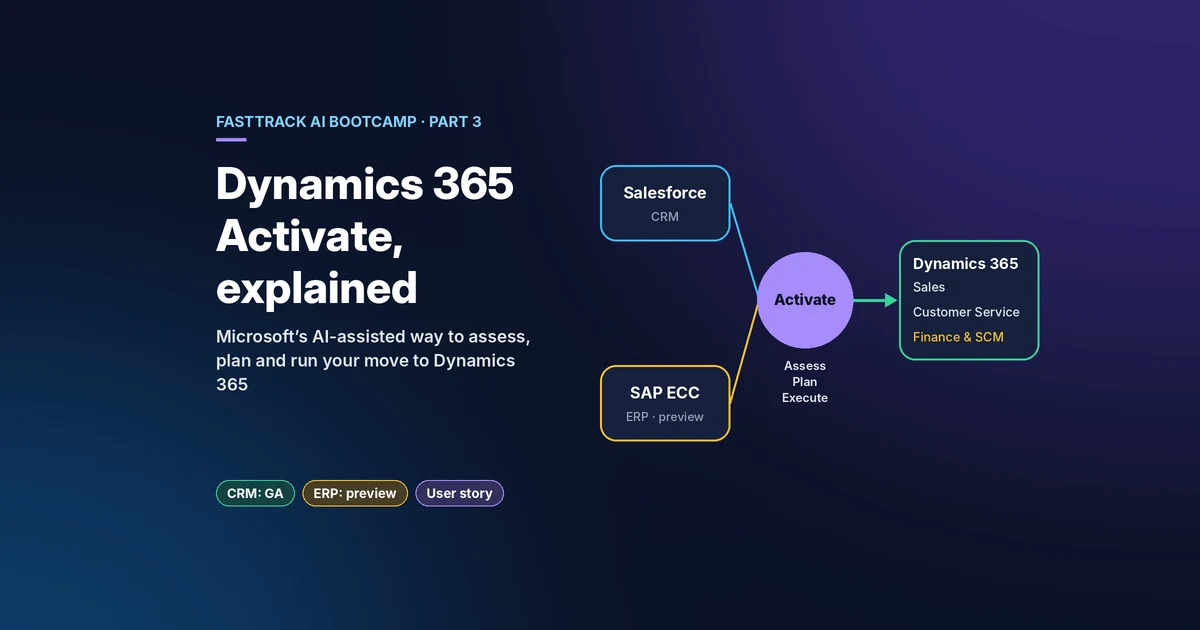
• Dynamics 365 Activate is Microsoft's AI-assisted tool for assessing, planning and running migrations to Dynamics 365.
• Today it moves Salesforce to Dynamics 365 Sales and Customer Service. Microsoft announced this CRM experience as generally available at Ignite on 17 November 2026.
• ERP is next, starting with SAP ECC in private preview.
• It scans the old system, scores complexity, suggests mappings, builds the Dynamics 365 schema, moves the data and reconciles record counts.
• It does not convert code or automation, and it doesn't replace the people who design the new solution.
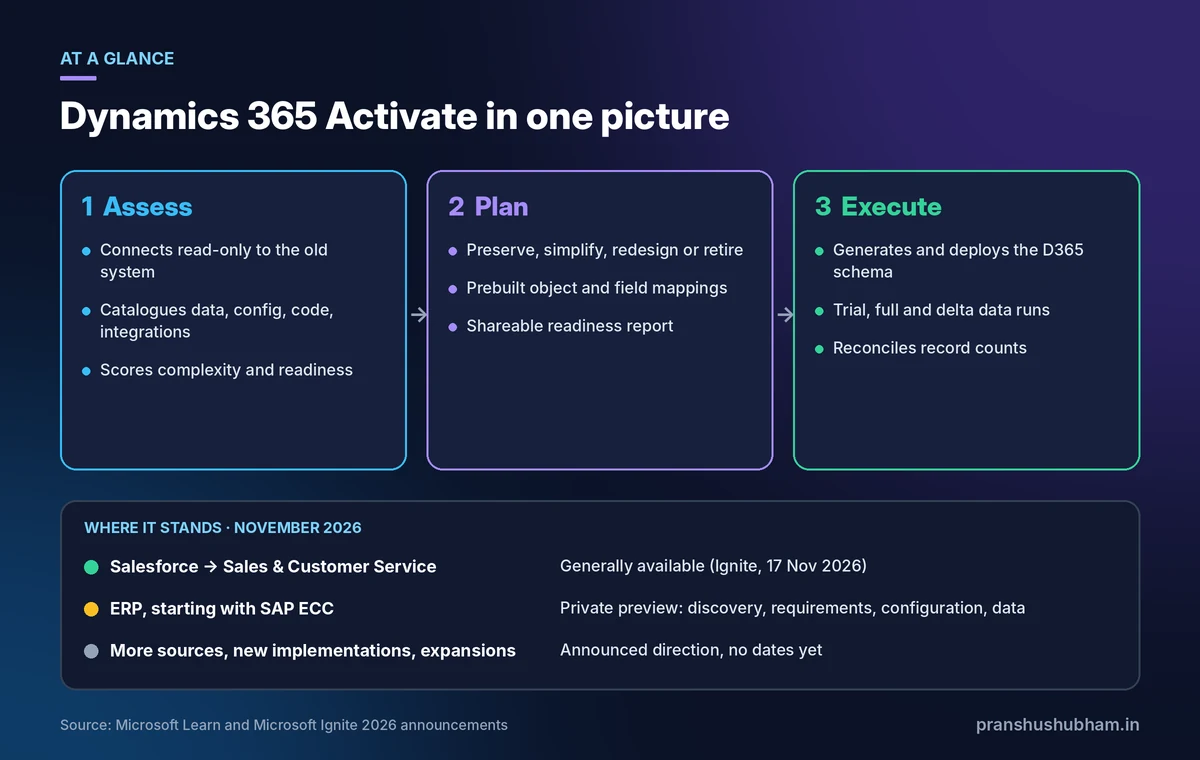
So what is Dynamics 365 Activate, in plain English?
Think of Activate as a very fast, very patient analyst who reads your old system from top to bottom before anyone books a workshop.
Microsoft describes it as a unified, AI-assisted implementation and migration experience for customers, partners and system integrators. It works in three moves:
- Assess. It connects to your current system and catalogues data structures, configuration, customisations, processes, integrations and dependencies.
- Plan. It scores complexity and readiness, and helps you decide what to preserve, simplify, redesign or leave behind, instead of rebuilding the old system brick by brick.
- Execute. It creates the target schema, migrates the data, and checks that what arrived matches what left.
The second point is the one I like most. The most expensive mistake in any migration is copying fifteen years of workarounds into a brand-new platform. A tool that starts by asking "do we still need this?" is a tool that saves money.
Where it stands today (November 2026)
Things are moving quickly, so here's the status in one place.
| Scenario | Status | What that means |
|---|---|---|
| Salesforce → Dynamics 365 Sales and Customer Service | Generally available (announced at Ignite, 17 Nov 2026) | Discovery, mapping, schema deployment, data migration and reconciliation. It started as a limited public preview on 9 September 2026. |
| ERP, starting with SAP ECC | Private preview | SAP ECC discovery finds migration gaps. Requirements analysis, configuration and data migration are also in private preview. |
| Other CRM and ERP sources, new implementations, expansions | Announced direction | Microsoft has said it will expand Activate to more scenarios over time. No dates yet. |
A few practical facts from the documentation: you sign up with a Microsoft Entra work account, you don't need Microsoft's approval to create a workspace, English is the only supported language, and workspaces are currently created in the US region. Some Learn pages still carry "preview" labels while the docs catch up, so check the current page before you plan.
How a Salesforce migration runs, step by step
Here's the journey Microsoft documents. I've turned it into a picture, because it's easier to remember that way.
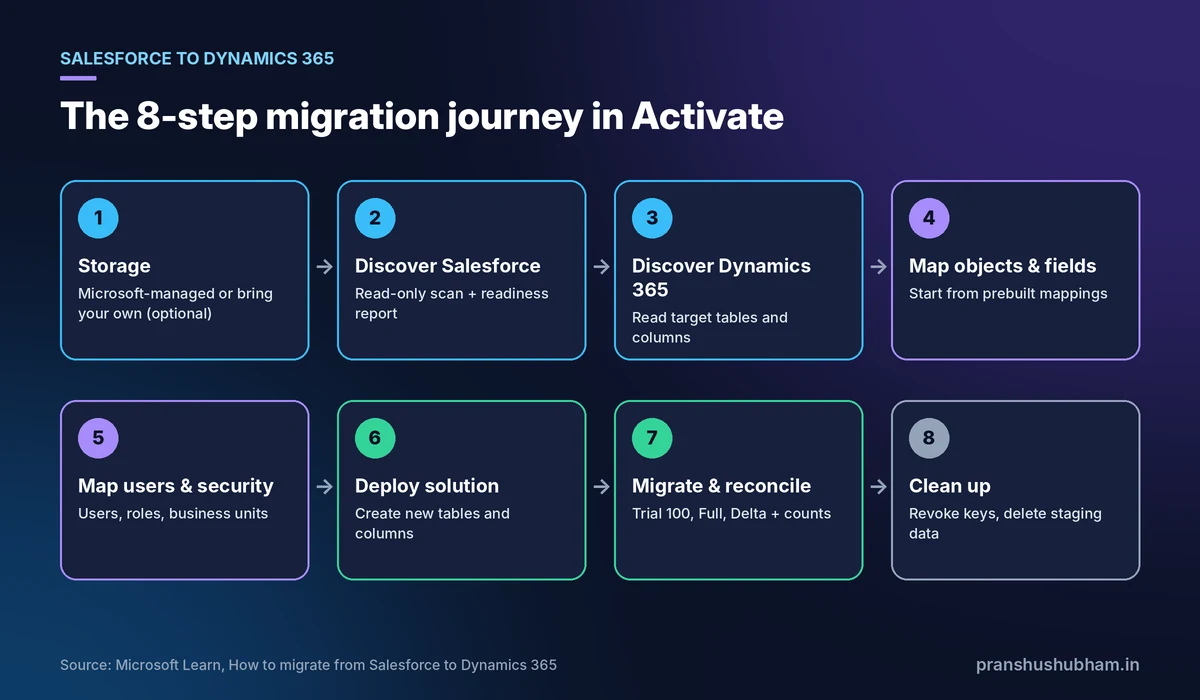
| Step | What happens | Why it matters |
|---|---|---|
| 1. Storage (optional) | Use Microsoft-managed storage, or bring your own Azure storage and database. | For companies that need migration data to stay in their own subscription. |
| 2. Connect Salesforce and discover | A least-privilege integration user connects in read-only mode and scans the org. | You get a readiness report you can download as PDF, Word or JSON and share. |
| 3. Connect Dynamics 365 and discover | An Entra app registration and Dataverse application user read the target environment. | Activate knows what already exists, so it doesn't duplicate tables. |
| 4. Map objects and fields | Prebuilt mappings for accounts, contacts, leads, opportunities, cases, activities, knowledge articles and more. | You review and fix low-confidence mappings instead of starting from a blank sheet. |
| 5. Map users | Matches Salesforce users to Dataverse users by email or username, plus profiles to security roles and role hierarchy to business units. | Ownership and security come across properly, not as an afterthought. |
| 6. Deploy the solution | Generates a Dynamics 365 solution for new tables and columns and imports it. | The schema exists before a single record moves. |
| 7. Migrate and reconcile | Trial 100, Full or Delta runs, live monitoring, and record-count reconciliation. | Test small, load everything, then top up changes before cutover. |
| 8. Clean up | Revoke credentials, remove staging data and delete the project. | A migration tool shouldn't leave keys lying around. |
What Activate actually looks at
Discovery is where the AI earns its keep. In a Salesforce org it catalogues ten areas:
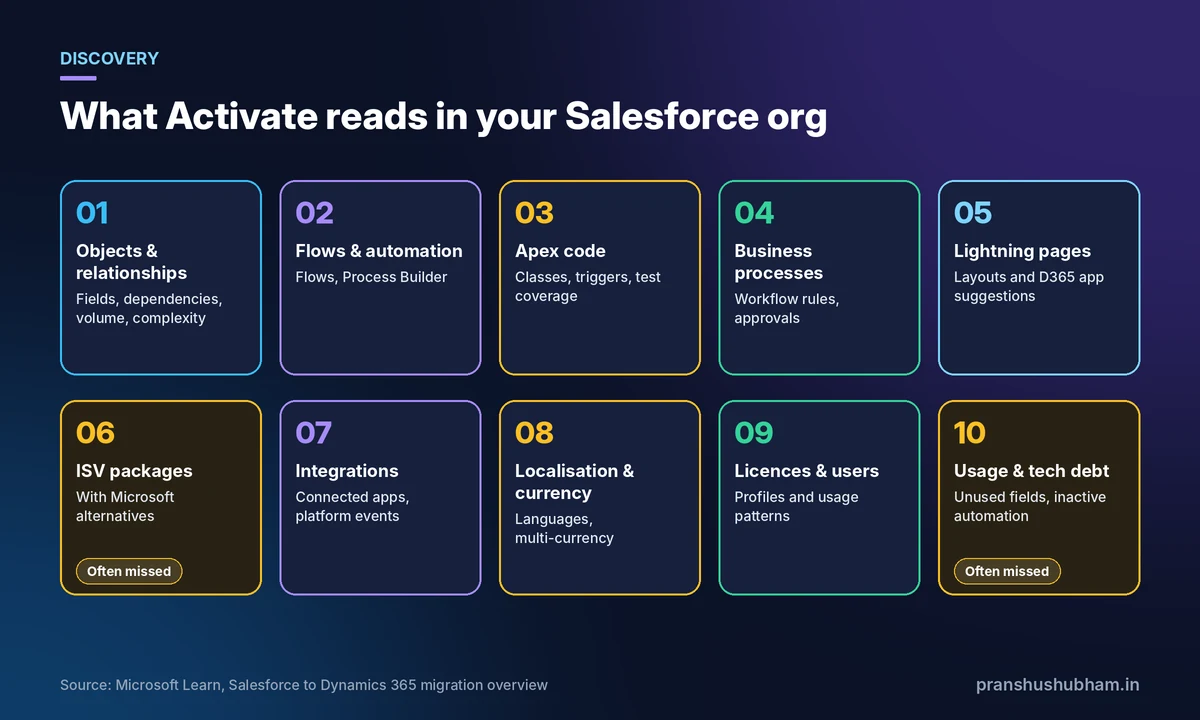
Two of these deserve a shout-out because teams usually discover them far too late:
- ISV packages: Activate lists installed managed packages and suggests Microsoft ecosystem alternatives. That's often where hidden licence cost and hidden scope live.
- Usage and tech debt: it highlights low-usage objects and fields and inactive automation. Every field you don't migrate is one less thing to map, test and train.
Pause and think: how many custom fields in your current CRM were filled in at least once in the last year? If you don't know, that's the first thing an assessment should tell you.
What it does not do (please read this bit)
Every new tool attracts myths. Here are the ones I'd clear up before a steering committee gets too excited.
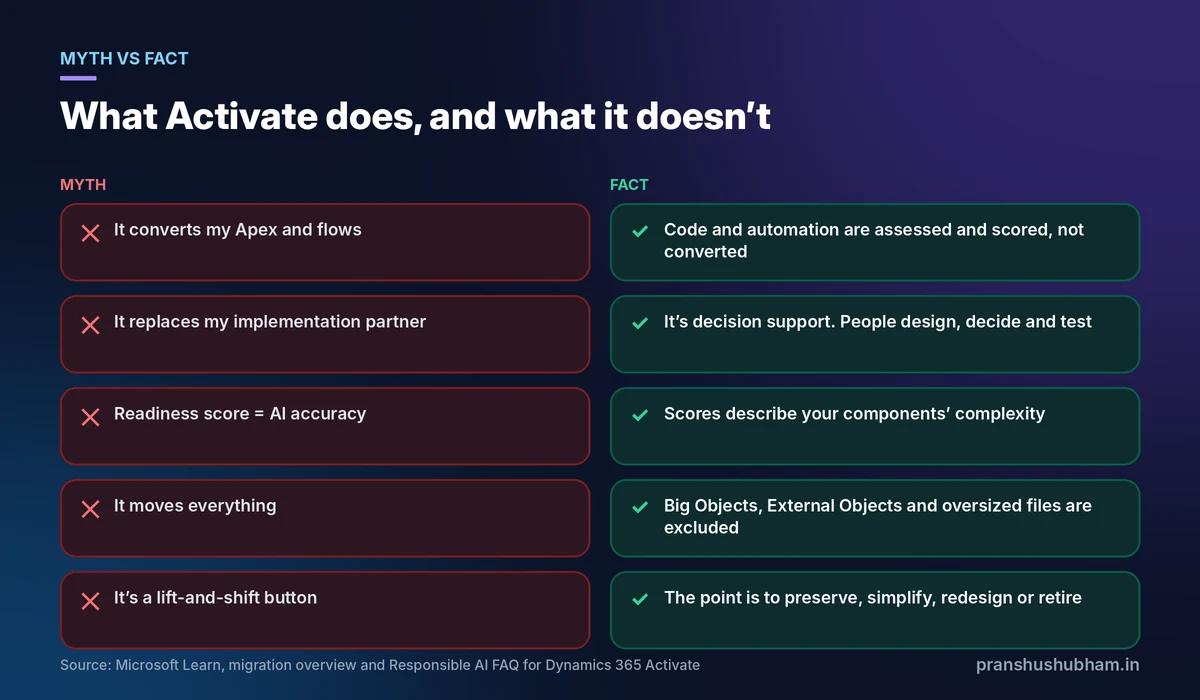
- It doesn't convert your code or automation. Flows, Process Builder, workflow rules and Apex are analysed and scored for effort, but not converted. Someone still redesigns that logic in Dynamics 365, ideally the simpler way.
- It doesn't decide scope for you. Microsoft's own Responsible AI FAQ says the recommendations are decision support and shouldn't be the sole basis for scope, estimates or deployment decisions.
- Readiness scores aren't an accuracy score. They describe how complex your components are, not how right the AI is.
- Not everything is in scope. Salesforce Big Objects and External Objects aren't included, very large files are skipped and reported, and Salesforce API limits can slow big migrations down.
- It isn't a lift-and-shift button. The whole point is to rethink, not to recreate.
Is it safe to point at our data?
This is always the first question from security teams, so here's the short answer, straight from Microsoft's documentation:
- Read-only on Salesforce. The application blocks write, update and delete operations against the source org.
- Encrypted credentials (AES-256-GCM) and TLS 1.2+ for every connection.
- Short-lived staging. Records are staged temporarily before they're written to Dataverse, with scheduled clean-up. You can use your own Azure storage if policy requires it.
- Data stays in Azure. Microsoft states the application doesn't send customer data to third-party services.
- Least privilege on the target. Activate works through a Dataverse application user, so its security roles decide exactly what it can touch.
What I took away from the bootcamp
I'll keep the session details to myself, but the big messages are worth sharing, because they line up with what Microsoft has now said in public.
- Human-led, AI-accelerated. Activate does the heavy reading and drafting. Consultants review, decide and sign off. Ignite's announcement says the same thing: project teams validate the agentic work.
- The consultant's job shifts up the value chain. Less time counting fields, more time on process design, data quality and change management. Honestly, that's the part clients pay us for anyway.
- ERP is the big chapter. CRM migrations were the starting point. ERP, where projects are longer and riskier, is where this could change the economics of implementation.
Partners are already sharing early numbers. At Ignite, Microsoft quoted congruentX saying one large enterprise is on track to move 20,000 users from Salesforce in about five months, against the 12 to 18 months these projects usually take, and Alithya saying side-by-side testing showed core finance setup could be delivered 25% faster. These are partner-reported figures, not guarantees, but they show where Microsoft is aiming.
A user story: what this looks like in a real business
This is an illustrative story built from typical migration situations. The company and people are fictional.
Fabrikam Outdoor sells camping and hiking gear through 40 stores and a busy online shop. Sales and service run on Salesforce, set up eight years ago and customised by three different partners. Finance and supply chain run on SAP ECC, and the CFO has a date circled in red: SAP's mainstream maintenance for ECC 6.0 ends in 2027.
The CIO, Maya, wants one platform, AI agents her team can actually use, and a project that doesn't eat two years. Her solution architect, Dev, has done this before. He knows the first three months usually disappear into discovery.
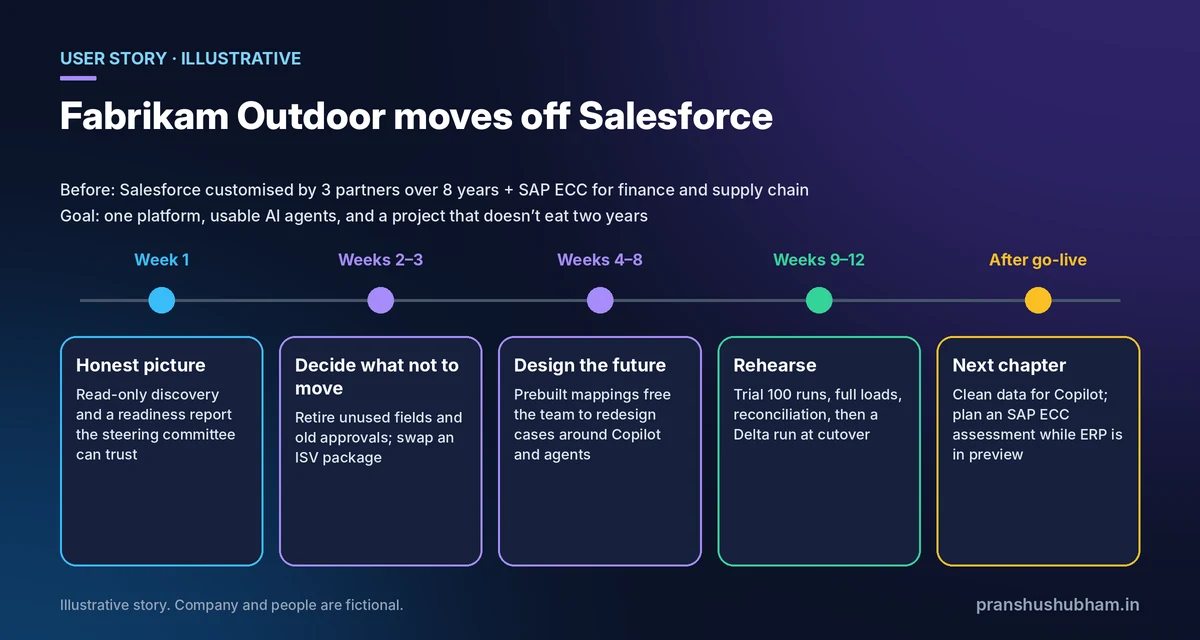
Week 1: the honest picture. Dev creates an Activate workspace, connects a read-only integration user to a Salesforce sandbox and runs discovery. By the end of the week he has a readiness report: objects and fields with complexity scores, every flow and Apex class rated for effort, the managed packages in use, and a list of fields nobody has touched in a year. For the first time, the steering committee is discussing facts instead of opinions.
Weeks 2 to 3: decide what not to move. With the usage report on screen, the business owners agree to retire a large share of unused custom fields and two old approval processes. One ISV package turns out to have a Microsoft ecosystem alternative already included in their plans. Scope goes down before design even starts.
Weeks 4 to 8: design the future, not the past. Activate's prebuilt mappings cover accounts, contacts, opportunities and cases, so Dev's team spends its time on the interesting work: redesigning the case process around Copilot and agents, and rebuilding the few automations that genuinely matter. Code isn't converted automatically, so they rebuild it the simpler way.
Weeks 9 to 12: rehearse until it's boring. Trial 100 runs flush out mapping issues early. Full loads into a test environment are followed by reconciliation checks: record counts match, ownership is correct, security roles behave. A Delta run brings the last changes across on cutover weekend.
After go-live: sales and service run on Dynamics 365, with Copilot working on clean, well-structured data. Meanwhile Maya's team has already asked about the ERP side. Because the SAP ECC experience is in private preview, they plan an assessment with their partner rather than a full migration for now.
What made the difference? Not magic. Faster discovery, fewer arguments about scope, and more consultant time spent on design and testing.
Why this matters for businesses right now
- AI needs clean foundations. At Ignite, Microsoft made Copilot the front door to Dynamics 365, with Sales, Customer Service and ERP plugins now generally available. Agents only work well on a clean data model, and a migration is the moment to build one.
- The SAP ECC clock is ticking. Many companies must decide their ERP future in the next year or two. A faster, evidence-based assessment helps that decision.
- Consolidation saves money. Fewer platforms, fewer integrations, fewer licences to manage.
- Risk shows up earlier. Dependencies and tech debt surface in week one, not in UAT.
Interactive: is Activate a good fit for your project?
Grab a pen and answer these eight questions with a yes or no. Give yourself one point for each yes.
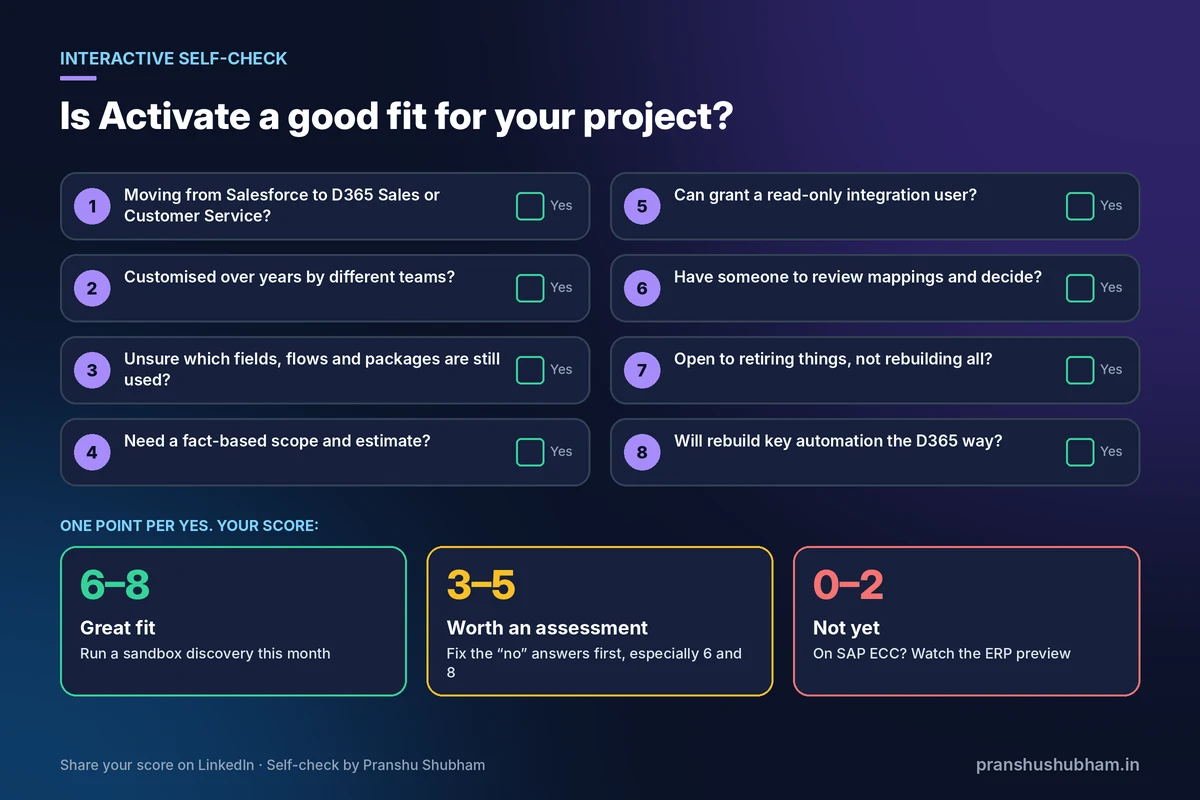
- Are you moving from Salesforce to Dynamics 365 Sales or Customer Service?
- Has your current system been customised over several years by different teams?
- Is nobody quite sure which fields, flows and packages are still used?
- Do you need a fact-based scope and estimate for a business case?
- Can you give a read-only integration user access to a sandbox or production org?
- Do you have someone who can review mappings and make design decisions?
- Are you open to retiring things instead of rebuilding everything?
- Will you rebuild key automations the Dynamics 365 way, rather than expecting conversion?
Your score:
- 6 to 8: great fit. Run a discovery on a sandbox this month.
- 3 to 5: worth an assessment. Fix the "no" answers first, especially questions 6 and 8.
- 0 to 2: not yet. If you're on SAP ECC, keep an eye on the ERP preview and talk to your partner.
Tell me your score in the comments on LinkedIn. I'm curious where most teams land.
Try it yourself in about 30 minutes
- Go to the Dynamics 365 Activate sign-up page and sign in with your Entra work account.
- Create a workspace (project type: legacy system migration, source: Salesforce, purpose: Dev or Test).
- Create a project, set up a Salesforce External Client App with a least-privilege integration user, and connect to a sandbox.
- Run discovery and download the readiness report.
- Read the report with your business owners. Circle what you would retire.
- When you're done, follow the clean-up step: revoke credentials and delete what you don't need.
What it means for you
| If you are a... | What Activate changes | What to do next |
|---|---|---|
| CIO or business leader | Faster, fact-based scope and earlier sight of risk. | Ask your partner for an Activate assessment before approving a budget. |
| Functional consultant | Less time cataloguing, more time designing. | Learn to read readiness reports and challenge mappings. |
| Solution architect | Evidence for preserve, simplify, redesign or retire decisions. | Build a decision log around the discovery results. |
| Developer | A clear, scored list of automation and code to rebuild. | Plan the rebuild in Power Automate, plug-ins or agents. |
| Fresher | A new skill employers will ask about. | Try the sign-up and quick-start docs on a trial or sandbox. |
FAQ
Is Dynamics 365 Activate free? Microsoft's documentation doesn't list pricing for it, and you can sign up without approval. Check with Microsoft or your partner for your situation.
Can it migrate to Dynamics 365 Finance or Supply Chain today? Not generally. ERP starts with SAP ECC in private preview.
Does it replace my implementation partner? No. It speeds up the analysis and the mechanics. Design, testing, data quality and change management still need people.
Will my Salesforce flows and Apex move across? They're analysed and scored, not converted. Plan to rebuild what you still need.
Can I keep migration data in my own Azure subscription? Yes, with Bring Your Own Storage and your own Azure SQL database.
Keep learning on this site
- Part 1: AI Agents in Dynamics 365: What I Learned in 3 Days at Microsoft HQ
- Part 2: 9 Free AI Agents for Dynamics 365 ERP
- Free e-book: Build Your First AI Agent for Dynamics 365 with MCP
- Free e-book: Data Migration for Dynamics 365 F&O
- Free e-book: Cutover and Go-Live Planning for ERP Programs
Sources (check them yourself)
- Microsoft Learn: Dynamics 365 Activate overview
- Microsoft Learn: Salesforce to Dynamics 365 migration overview
- Microsoft Learn: How to migrate from Salesforce to Dynamics 365
- Microsoft Learn: Access and set up Dynamics 365 Activate
- Microsoft Learn: Responsible AI FAQ for Dynamics 365 Activate
- Partner Center: September 2026 announcements
- Microsoft Dynamics 365 Blog: Microsoft Ignite 2026, Introducing Dynamics 365 in Copilot
- Pulse 2.0: Microsoft launches Dynamics 365 Activate
Planning a migration or thinking about the SAP ECC question? Get in touch. I read every message.