Dual-write vs Virtual Tables: Choosing the Right Dynamics 365 Integration
Dual-write copies data between Dynamics 365 F&O and Dataverse; virtual tables show it without copying. How to choose, with a decision table and design rules.
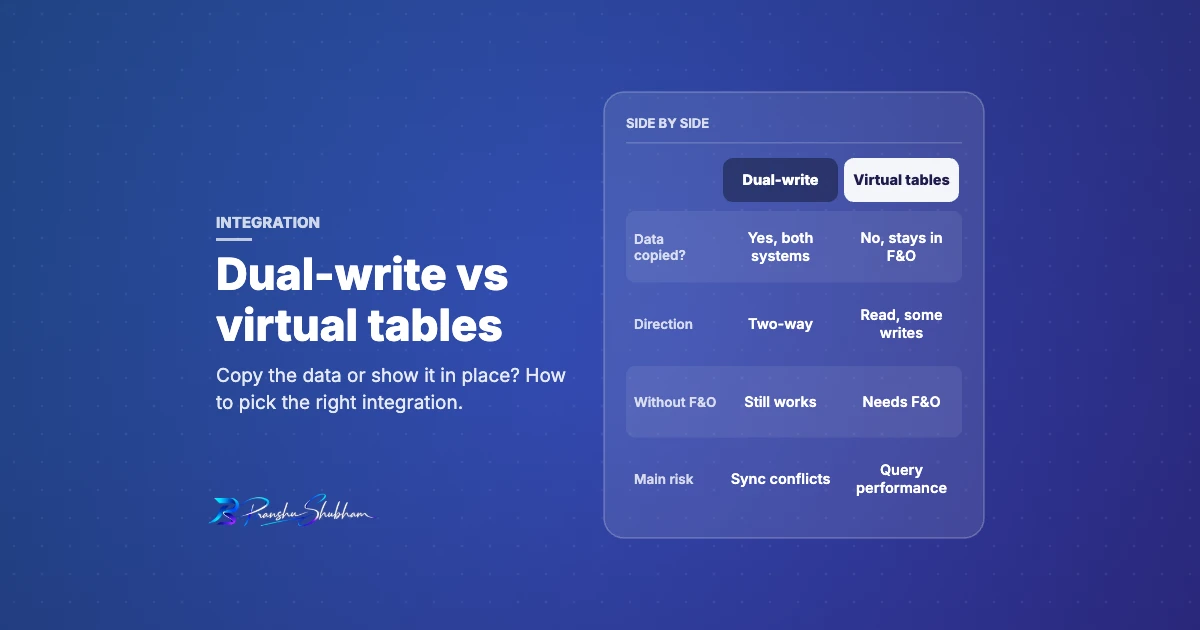
When Dynamics 365 Finance and Supply Chain Management needs to share data with Dataverse, and therefore with Dynamics 365 Sales, Customer Service, Field Service or Power Apps, two Microsoft options come up first: dual-write and virtual tables. They solve different problems. Picking the wrong one leads to sync conflicts, slow apps or data nobody trusts.
What each one does
Dual-write is Microsoft's out-of-box infrastructure for near-real-time, bidirectional integration between F&O and Dataverse. When a mapped record changes on one side, it is written to the other. Microsoft describes it as tightly coupled. The data exists in both places.
Virtual tables (also called virtual entities) let Dataverse show F&O data entities as if they were Dataverse tables, without copying the data. The data stays in F&O; Dataverse reads and writes through to it at runtime.
Side by side
| Question | Dual-write | Virtual tables |
|---|---|---|
| Is the data copied? | Yes, into both systems | No, it stays in F&O |
| Direction | Bidirectional | Read, and write-through where supported |
| Best for | Shared master data and key documents: customers, vendors, products, quotes, orders | Viewing or occasionally updating F&O data in Dataverse apps |
| Works offline from F&O? | Yes, the Dataverse copy is there | No, it needs F&O at runtime |
| Main risk | Sync conflicts and errors to monitor | Performance with large or complex queries |
When dual-write fits
- Sales and finance teams both need to create and update the same customers or products.
- A CRM process (lead to quote) must hand off cleanly to F&O order processing.
- Dataverse apps need the data even when they run heavy queries of their own.
When virtual tables fit
- A Power App or Sales user only needs to see F&O data, such as on-hand stock or invoice status.
- Volumes are modest and the data changes often in F&O.
- You want to avoid storing a second copy and keeping it in sync.
When neither is right
Dual-write is built for master data and key documents, and it has transaction limits. For high-volume transactional flows, look at the Data management framework, business events or middleware with Azure Integration Services. For analytics, use the dedicated data export options such as Fabric link rather than either of these.
Design rules that save projects
- Decide ownership per field. For example, sales owns contact details; finance owns credit limit and payment terms, read-only in Sales.
- Align keys and number sequences before the initial sync, so records match on both sides.
- Enable only the maps you need. A map enabled "because it is there" creates conflicts nobody planned for.
- Plan the initial sync. Load data on one side first, then synchronize.
- Assign an owner for errors. Use the dual-write error logs and alerts, and review them daily during hypercare.
Frequently asked questions
Can I use both? Yes. Many programs use dual-write for shared masters and virtual tables for read-only views of transactional data.
Is dual-write real-time? It is near real-time and tightly coupled, which is why errors on one side can affect the other. Design error handling from day one.
Do virtual tables need a license? Licensing changes often. Check current Microsoft licensing guidance for your scenario.
Go deeper
Download the free e-books Dynamics 365 F&O Integration Patterns and Lead-to-Cash with Dual-write, watch Dual-write Explained, or join the Dynamics 365 Integration Patterns Workshop.